Recent updates

Follow new updates and improvements to Plannr Technologies.

NEW! 🎉 Vitality and ReAssure EDI statements are now here 🚀

Great news, we know a number of you have been waiting for additional EDI statements.

We have had correspondence between the Providers and Opentext over the last few weeks and received a couple of statements to prove the process so we are ready to launch.

Please see our updated Support article for details of how to request Vitality or ReAssure statements via EDI.

Any queries though, please do reach out on the live chat to let us know.
New

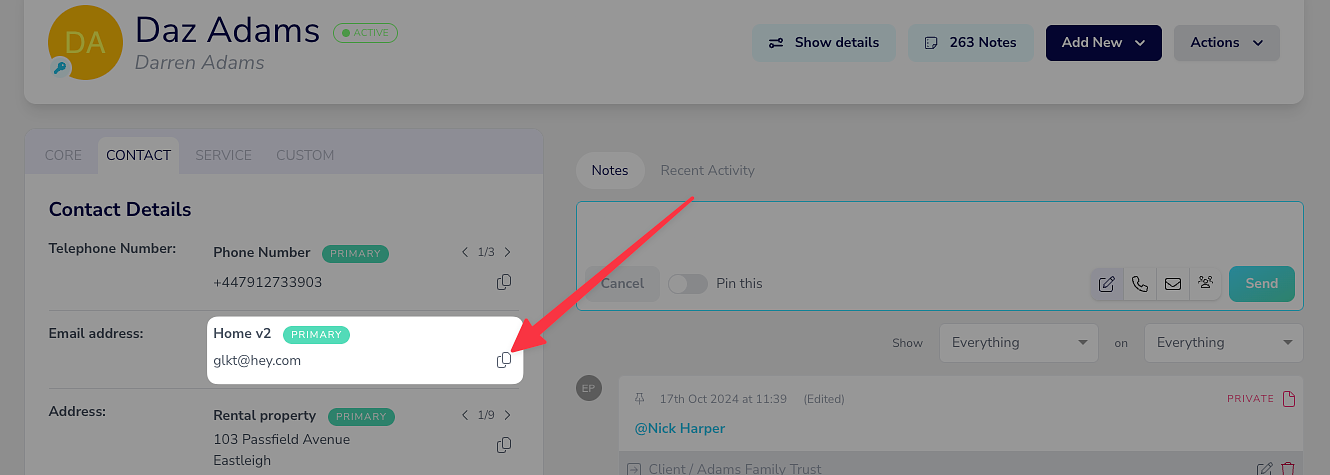
New: Click-to-copy now live!

We’re excited to share another little update that’s just gone live on Plannr and this time it’s click-to-copy!

A few of you provided some feedback that it would be really awesome if Plannr could offer a convenient way to quickly copy data out of the system and we’ve gone and built something that we think you’ll really like!

In Plannr, against various client fields you’ll see a new icon to copy. When clicked, this icon will automagically copy the content to your clipboard, ready to pop into something else. Handy!

The click-to-copy currently works on the following fields:

  • Client date of birth

  • Client National Insurance Number (it’ll even strip out spaces)

  • Client contact number

  • Client email addresses

  • Client addresses

If you can think of anywhere else where this would be useful, please do let us know!

We hope you like this little quality-of-life improvement.

New

Earlier updates